

How do I add affiliate links to my profile?
Every Pro subscription lets you embed your own affiliate links in your profile, so you earn residual income from viewers who sign up while you broadcast.
Last updated
Every Pro subscription includes profile monetization: the option to embed your own affiliate links in your profile. Viewers who sign up to Chaturbate through your profile get credited to you, and you keep earning from those signups long after the stream ends.
Plenty of Pro models haven't switched this on yet. Here's how to turn it on.
How it works
Chaturbate pays affiliates for the new users they refer. With Pro, StreamerSuite embeds your personal affiliate link in your profile, so anyone who joins Chaturbate after finding you counts as your referral. You broadcast as normal. Your profile does the rest.
Step 1: Open your analytics settings
Log into your StreamerSuite dashboard and go to Settings → Analytics, or head straight to streamersuite.com/dashboard/settings/analytics.
Scroll down to the Profile monetization section at the bottom of the page.
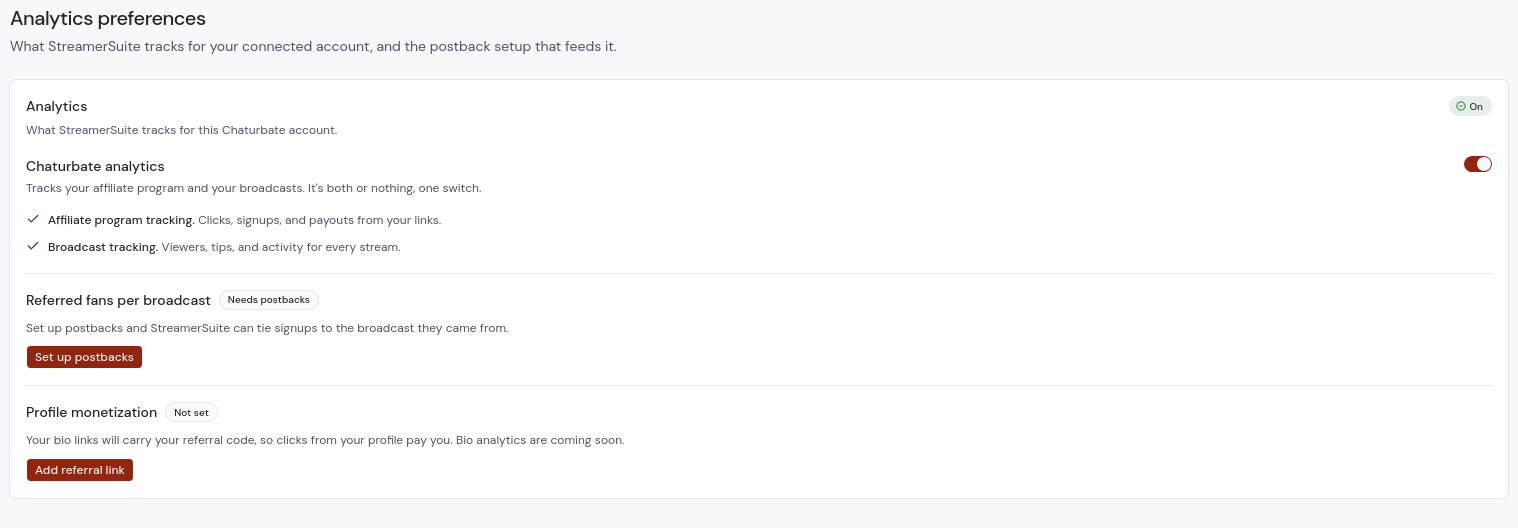
Step 2: Add your referral link
Click the red Add referral link button. A modal (pop-up box) will open that walks you through it: open your Chaturbate link codes page, copy any link code, and paste it in. We pull the campaign code out of the link for you.
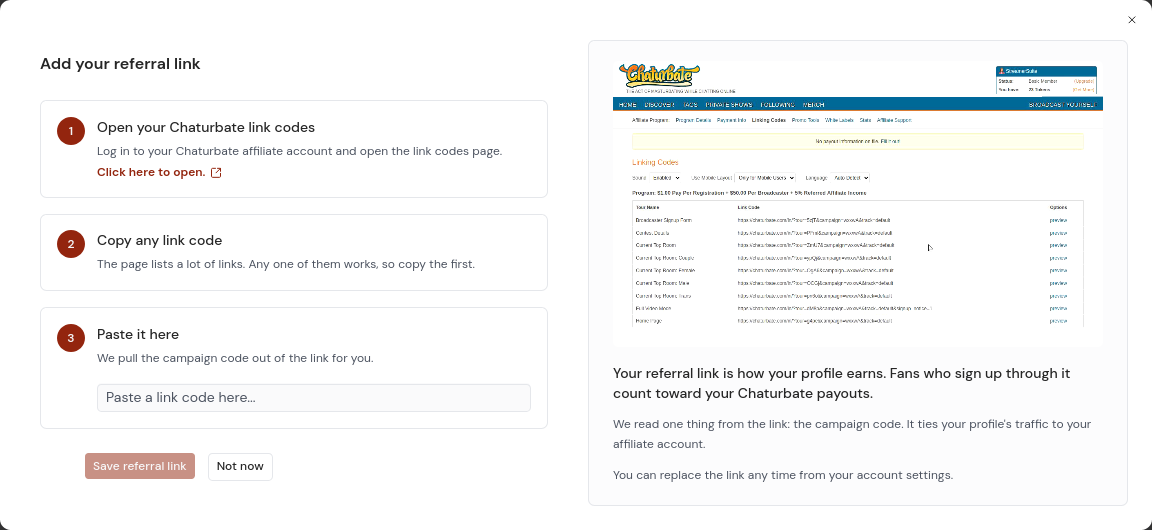
Click Save referral link and you're done.
Click play to watch a short demo video
Where to see your signups
Once your link is live, referral signups show in two places:
- Your Chaturbate affiliate stats at chaturbate.com/affiliates/stats.
- Your StreamerSuite analytics dashboard at streamersuite.com/dashboard/analytics, where we track referrals alongside your other stats.
Check back after a few broadcasts and watch the signups build.
Don't see the Profile monetization section?
Affiliate links are included with every Pro subscription. If the section isn't showing in your analytics settings, your plan may not be Pro. Check your plan at streamersuite.com/dashboard/settings/billing, and if something still looks wrong, contact support and we'll sort it out.
Want the strategy behind it?
Turning the link on is step one. The bigger wins come from making signups part of your show. Our blog post The KPI most models ignore covers signup goals, live tracking, and converting anonymous viewers into registered fans.